Request a demo

The answer is already in your documents. Docuvia underlines it.

An assistant for small firms that reads your fees, contracts and deadlines on your own computer and answers every question with the exact citation: document, page and passage. By default, nothing leaves the computer.

For small accountancy, advisory and law firms.

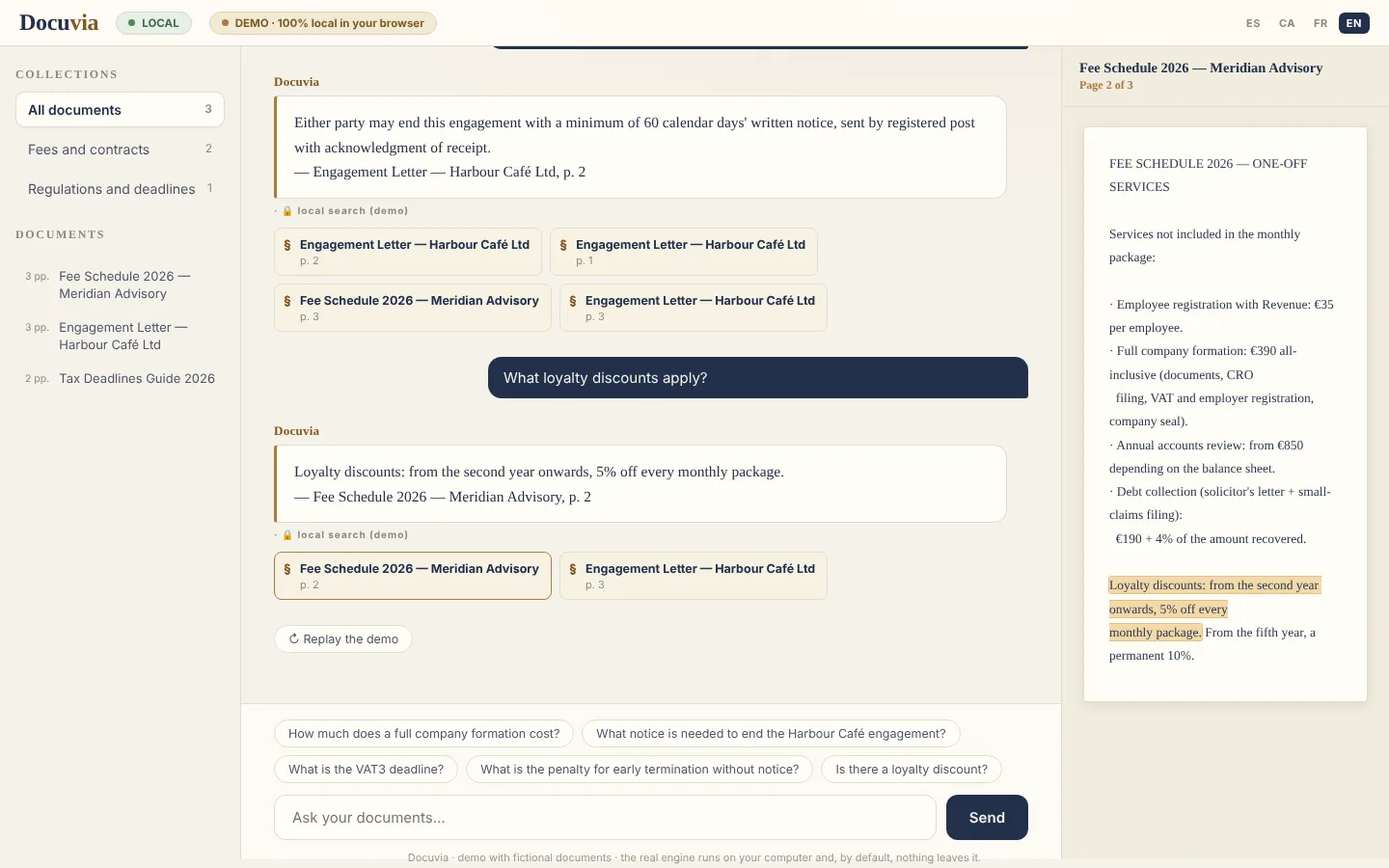
Is there a loyalty discount?

Fee Schedule 2026 — Meridian AdvisoryPage 2 of 3

FEE SCHEDULE 2026 — ONE-OFF SERVICES

Services not included in the monthly package:

  • Employee registration with Revenue: €35 per employee.
  • Full company formation: €390 all-inclusive (documents, CRO filing, VAT and employer registration, company seal).
  • Annual accounts review: from €850 depending on the balance sheet.
  • Debt collection (solicitor's letter + small-claims filing): €190 + 4% of the amount recovered.

Loyalty discounts: from the second year onwards, 5% off every monthly package. From the fifth year, a permanent 10%.

DocuviaYes. From the second year, 5% off every monthly package; from the fifth, a permanent 10%.— Fee Schedule 2026 — Meridian Advisory, p. 2

What takes minutes today, in seconds.

Today

  1. A client calls: “what notice period is in my contract?”
  2. You open their folder, then your inbox, then another folder.
  3. A few minutes later you find the clause. Or you call back later.

With Docuvia

  1. You type the question as it was asked.
  2. The answer appears with its source: document and page.
  3. One click opens the page with the passage highlighted. You answer during the call.

How it works

  1. 1

    One folder

    The firm copies its PDF, Word and TXT files into one folder. Docuvia only reads what is inside: not the disk, not the inbox.

  2. 2

    An index on the computer

    Docuvia reads the documents, scans included, and organises them by meaning. No external servers.

  3. 3

    Cited answers

    Every answer comes with its source. If something is not in the documents, Docuvia says so.

The panel, as you would use it

A real capture of the demo, with fictional documents. You can try it right here, in the browser.

Open the demo
Docuvia panel: collections on the left, the cited answer in the centre and the cited page on the right, with the passage highlighted
  1. Collections: ask within one topic or one client only.
  2. The answer, with its document and page.
  3. The cited page, with the passage highlighted.

What Docuvia commits to

  1. Art. 1

    Always cite its source

    Every answer gives the document and page; one click opens the highlighted passage.

  2. Art. 2

    Say when it does not know

    If the information is not in the documents, it says so instead of improvising.

  3. Art. 3

    Keep each client separate

    One collection per client or subject, so you only ask where it matters.

  4. Art. 4

    Read scans too

    Text recognition (OCR) included, in English, Spanish, Catalan and French.

  5. Art. 5

    Log questions, never documents

    A local log of what was asked and when, for the firm’s internal control.

  6. Art. 6

    Work in your language

    Interface in English, Spanish, Catalan and French; each document is quoted in its original language.

What already works, and what is coming

Available

  • Search by meaning across your documents
  • Cited answers and honest refusals
  • Collections per client or subject
  • OCR for scanned documents
  • Windows installer in four languages
  • Local log of questions

In preparation

  • Compare a clause across all contracts
  • Firm-specific suggested questions
  • Several workstations with user and password

Frequently asked questions

Do I need internet?

No, unless you turn on Gemini mode. The whole engine (search, index and local language model) runs offline: internet is only used for installation.

What computer do I need?

It depends on the answers you want. With 16 GB of RAM or more, Docuvia drafts locally with the full model; with 8 GB, with a lighter and faster model; with less, it answers instantly with verbatim quotes. In all three cases nothing leaves the computer and no graphics card is needed: without one, drafting speed depends on the processor. The installer measures the computer’s RAM and speed and picks automatically.

Can I use the cloud for faster answers?

Yes, if the firm decides so. With Google's paid API (Gemini), drafting happens in the cloud in seconds: documents stay on the computer, but the passages cited in each answer travel to Google as they are, not anonymised. Google does not use them to train its models and every answer says so with a 'via Gemini' label. The free API is not suitable for client data. Leave it off and nothing leaves the computer.

How does Docuvia access my documents?

It never reaches anywhere on its own. You point it at a single folder and it only reads the PDF, Word and TXT files inside it (scans via local OCR). To add or remove documents, copy or delete them in that folder and re-index: nothing is imported automatically.

Do my documents stay at the office?

Yes, always. The index lives on your disk and there is no outbound channel — except Gemini mode, which you alone choose to enable and which only sees the cited passages.

How long does setup take?

One morning is planned: copy the documents folder, index, and 15 minutes of team training.
Your computer and your data

You choose where the AI works. By default, on your computer.

Docuvia always searches and quotes on the computer itself. What changes with its power is who drafts the answer: an AI model installed on the PC or, if the firm decides so, an external service.

Choose your computer

Full local drafting

Qwen3 4B model (2.5 GB), installed on the computer

Docuvia drafts clear answers, with their citations. It runs without a graphics card: speed depends on the processor, and a graphics card makes it markedly faster.

  • No document or question leaves the computer.
  • Also works offline.
  • The recommended option for a firm.

Your computer

  • Documents
  • Index and search
  • Local AI

Nothing leaves the computer

Light local drafting

Qwen3 1.7B model (1.4 GB), installed on the computer

Drafts faster on a standard office PC, with slightly simpler sentences. The citations are exactly the same.

  • No document or question leaves the computer.
  • Also works offline.
  • A good fit for office PCs.

Your computer

  • Documents
  • Index and search
  • Local AI

Nothing leaves the computer

Verbatim quotes

No drafting model

Docuvia answers instantly with the exact sentences from the documents and their citation. It does not draft, but it cannot get a summary wrong either.

  • No document or question leaves the computer.
  • Also works offline.
  • Runs on any PC from the last few years.

Your computer

  • Documents
  • Index and search
  • Verbatim quotes

Nothing leaves the computer

Cloud drafting (Gemini)

Google’s paid API

For fast drafting on a modest computer. Documents and search stay on the PC, but the passages cited in each answer are sent to Google to be drafted.

  • Cited passages leave the firm as they are: they are not anonymised.
  • With the paid API, Google does not use them to train its models.
  • Every answer says so with a “via Gemini” label.
  • The free API is not suitable for client data: Google may use it to improve its products.

Your computer

  • Documents
  • Index and search

Cited passages, not anonymised

Drafted answer

Google Gemini

Privacy

Absolute privacy, by design

  • In local modes the engine, index and AI run on your computer: no document or question leaves it. External mode (Gemini) is optional, decided by the firm, and sends the cited passages without anonymising them; every answer says so.
  • Only local audit logs of queries are kept — never the content of documents.
  • Aligned with French professional secrecy (art. 226-13 of the Criminal Code) and its Spanish equivalent.

How much time does your firm waste searching for what it already knows?

Setup planned in a morning. 4-week pilot on your real documents. Fixed monthly price.

Book a demo at your office